Anatomy of a Viral Success: Seth Casteel, Underwater Dog Photography

I know, it totally seems like I harsh on people for not having their sh$t together, so I thought I would take some time to focus on someone who got everything very, very right and is reaping the benefits of that preparation in his career.

DogsYou probably still don’t know the name “Seth Casteel,” but chances are you’re
familiar with his work.   One year ago, his underwater dog photography series went viral, and because he was prepared, this sudden rush of fame and attention took his career to the next level.

Here is the Facebook album where I (at least) first encountered Casteel’s photography.

Note the caption that appears next to every single photo:

We’re loving this underwater dog series from photographer Seth Casteel.
See more from Seth here: https://www.littlefriendsphoto.com/ 

If you like Seth Casteel’s underwater dog photography,
please show some love and follow his official Facebook page “Little
Friends Photo” here:  https://www.facebook.com/LittleFriendsPhoto

Now, maybe this is the original poster being thorough, but if Seth Casteel hadn’t had an easily-findable website and social media presence, those links wouldn’t have been included, and who knows?  Maybe he wouldn’t have gained thousands of new clients, a print calendar, photo licensing up the wazoo, and a book, all in the past year.  This, friends, is how you do “The Business of Art.”

Let’s take a look at what happened in the “overnight success” story of Seth Casteel.    Here’s what he’s doing right:

Website:  well-organized, clear, easy to get in touch with him.   https://www.littlefriendsphoto.com/index2.php#!/home.

Here’s one thing I love about Seth Casteel:  his website looks great.  It is fully functional, up and running, and he was 100% prepared for the onslaught of attention and new work.   Good looking, brand-appropriate site, clear e-commerce section, Contact Us button is easy to find.  Another thing I love about this site is that the VERY FIRST IMAGE you see reminds you of why you came there—you saw the underwater dog photography on Facebook (or somewhere else), thought it was amazing and innovative, and wanted to see what else this person had going on (or if he could take photos of your dog).

Facebook Fan Page:  Once again, well-organized, up to date, the username is right, and he’s properly using a Facebook Fan Page (not a profile).  https://www.facebook.com/LittleFriendsPhoto

Twitter:   He shoots, he scores again!   This Twitter profile is up to date, it has links back to his main site and Facebook page right there in the profile, and he is regularly answering all of his tweets.  Another example of a creative type being ready for success when it came along.  https://twitter.com/ltlfriendsphoto

Instagram:  There he is again.  Check the link in the center of the profile, right back to his main website.

Wired magazine story:  https://www.wired.com/rawfile/2012/03/diving-dogs-are-good-catch-for-photographer/

And, so, to sum up:  Seth Casteel has been doing awesome dog photography for many years, and also happens to have been awesomely organized and business-like about his digital presence.  Please take an example from him, and use it to motivate yourself to get organized in anticipation of YOUR big success!

Also, I totally have this book, and it is every bit as cool as it looks.  Get it!

To Pen Name or Not To Pen Name? That Is The Question!

pen name
photo courtesy of Flickr

To Pen Name or Not To Pen Name? That Is The Question!

I am a corporate consultant with a straight-laced job, but, I write erotica. How do I remain ‘genuine’ online yet keep those two personas separate.

Very good question, and one people ask quite a bit. What are the disadvantages and advantages of having a pen name? This is tough for people because we say ‘brand the author, not the book,’ right? But this situation is a bit different.

Let’s deconstruct.

1)    Privacy. This is the biggest advantage of having a pen name, particularly for the erotica genre. One of my clients is an MBA in a top corporate job, and one of our first orders of business was to set up her branding as an erotica author with a pen name.

Not only did this keep her job out of the equation, it also kept her family protected – especially important because she had teenaged children who would no doubt be horrified! And a husband who also had a conservative job.

She’s also quite active in her church with her family, so this was another important consideration for her.

Another client writes hot thrillers using his real name, but not a real picture. He’s in banking and doesn’t want his real life to mix with his persona.

2)    Persona. Choosing a pen name allows you to become, to an extent, the best representative of your content. This allows you to become the content, if you will. For example, if you normally write MG or YA and you want to write BDSM or other hardcore material, it gives you a chance to be far racier in your online life than you would be in real life.

And this is an important distinction with regard to branding: you have written this content, whether it is based on real life or fantasy. You can interact with people you normally never would (which brings a whole other perhaps unwanted element, but that’s another point). The biggest advantage to creating this persona is being consistent – you are representing your books and your content across all channels of your erotica author platform.

This is where you can really delve into your interests as an erotica writer that you may not normally share on your more traditional author profile.

3)    Branding. Let’s delve further into branding. I usually recommend that an author use their real name and use their picture as their avatar, but that becomes difficult if you’re trying to keep your private life private. In this case, many erotica authors use a ‘hot’ photo of some sort that has to do with their work.

And that’s appropriate in this case. Regardless of whether you are writing erotica or say, textbooks, it is possible to create different personas.

I do recommend still branding the author no matter the books. How? I think Bella Andre does it best: she has three pen names, each dedicated to a different genre. She personally hasn’t kept it a secret, but initially she did.

Finally, a quote from talented erotica author, Sandra Bunino:

‘I find myself walking a fine line between being genuine for my readers and maintaining the privacy and security of my non-online life. I love to engage my readers on social media and try to be accessible. I believe it’s an important part of the connection between reader and author.

That’s one reason I decided to use an actual picture on social media, my website and book promotions, though I do use a pen name. Of course, that overlap can be risky. There are times when my personal life and author persona collide and I’m okay with that. I’m proud of my work as an erotic romance writer. If it makes someone uncomfortable, it’s their issue, not mine.’

There are a few more considerations, but if you think ‘brand the author, not the book’ in all aspects of your promotion (whether your true self or a persona), you’ll achieve success!

What are your thoughts? Do you have a pen name? Share your experiences with us!


The “How” of Hugh Howey

Major news sources cover “self publishing success stories” all the time.  Interestingly, all of them tend to leave out the “how” of the story.

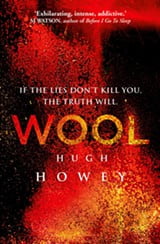
woolI’m an author and am interested in all things internet and marketing (and internet marketing), so naturally I am interested in any and all success stories, especially stories that involve self publishing (which of course combines authorship with the internet).   With that in mind, yesterday one of my Facebook friends referred me to a piece that was running on Marketplace.   First, I went over to read the story on American Public Media’s website, which you can see here:  http://www.marketplace.org/topics/business/big-book/best-selling-novelist-youve-never-heard

They’ve also now posted the interview—go over and listen!

As I’m reading the story, all I can think is:  I hope Kai Ryssdall (the host of Marketplace) asks this author how he did it, because that is (literally) the million dollar question on everyone’s mind when they hear about a self-publishing success story:  what did they do that I can do?  How can that be me?

That is where I come in.   If (as in this case) the reporter does not ask the author about how they actually did it, I ask the author myself, and if they don’t answer, I attempt to reverse-engineer their network so I can tell you what I think they are doing right, and how you can do these things yourself (hopefully with the same results).

The last time a self-published author who got a book deal caught my eye, it was Brittany Geragotelis’ 3-book deal with Simon & Schuster.   Right after the news broke about her deal, I reached out to her to get more of the story about how she did it, and she could not have been nicer about sharing her journey.   Brittany and I are now friends, and I continually admire her work ethic.   Her “secret,” in case you’re wondering, was being very active on WattPad, very organized in her author platform and branding, and very consistent in her interaction with her readers (as well as being a great writer, of course!).  Brittany treats being an author like a business, which (in my opinion) is really what you have to do to be successful.

After the Hugh Howey article / interview ran yesterday, I was so curious to know how he did it, I tweeted him to see if he would agree to be interviewed for this website.   Here was his reply:

Screen Shot 2013-03-19 at 11.38.34 AM

(sad trombone).  Can I just say that it bugs me to no end when successful authors are coy about their methods?   Dude– you are successful.  People want to know what worked for you.  I feel like if you’re successful as an author, the LEAST you can do is outline what you think might have worked to get you there.

Because he doesn’t want to comment (and because I do not accept “luck” as a method that can be replicated), I took a look at his network and asked a few other publishing types, and this is what we’ve come up with so far:

–He is a great writer.   This is the one thing on the list that will make you roll your eyes, because talent is something you really can’t control.

–He is very prolific.   Hugh Howey is less than 40 years old and has written 14 books, has an active website presence, and participates in at least three social media sites that I can count.   Does this motivate you to finally finish your first novel?  It should.

He knows his genre.  Howey writes in a genre that is compatible with online promotion/ word of mouth.   Fellow BookPromotion.com contributor Katherine (Sears) and I recently had a whole discussion about how some genre just sell better online, and science fiction (Howey’s genre) is one of them.   Also, his books are series books.  Based on work with clients and my own experiences, I will say that it definitely is to your advantage if you can write a series of books, because (at least electronically) you can link them together and keep people buying and reading.  It really does come down to the first book in the series having great characters and interesting action, but the series is a great “repeat product” model.

He is organized and responsive.   Just like several other successful authors we’ve profiled, Hugh Howey was ready for his “big break.”  When he saw that people were responding to “Wool,” he wrote more books for that series.  Same with his “Molly Fyde” series.

He regularly gives books away for free.   This is that topic that authors argue about all the time because they think “free equals no value” and they cite that statistic where 75% of all books that get downloaded for free never get read.   Note:  I’m not telling you to give your books away for free.  I’m simply saying, Hugh Howey does it, and might be part of why he’s so successful.

He uses social media.    Howey mentioned in a recent Media Bistro interview that he likes to go on Facebook and unwind, though it must be mentioned—Mr. Howey, you have a Facebook Profile linked from your main website instead of a Facebook Fan Page.   This is not something we recommend, since Facebook can take away your profile for having too many “friends” you don’t actually know.    He also tweets regularly (so, he’s not just a “syndicator”).   Facebook and Twitter are both great platforms for connecting with readers.

He blogs.   If you are thinking of complaining about how you don’t have time to blog/ regular updates are just too hard/ etc, please check Hugh Howey’s website.   Apparently he has enough time to have written 14 books and be at work on three others while updating the blog on his site once a day (on average).

He’s on Reddit.   Here’s an interview he did where he talks about some of his promotional methods (including Facebook and reader recommendations).     Reddit is a perfect place for Howey to connect with tech nerds who might also happen to be sci-fi geeks (I mean that in the most loving way possible, sci-fi geeks.  I know how to play Magic: the Gathering, ok?).

— He has a newsletter. I signed up for his newsletter (which is run through MailChimp, a service we highly recommend), and I am interested to see if he regularly sends out updates.    No way of telling how many people he has on this list, but since he’s sold more than $1 million worth of books, I am going to guess that he a) has a lot of people on that list, and b) is in regular contact with the members.  This would explain the large number of Amazon reviews and strong sales of each subsequent book in each series (oh, also?  He dances for reviews  on YouTube).    I would definitely put “build and stay in contact with your mailing list” at the top of my recommendations for authors, although I do find that this is the one thing that most of them are missing.

The bottom line for me is that this is an author who is treating his writing career like a business, and it shows.  He’s set up and organized with his website, he regularly connects with his fans, he writes a ton, and he sees what is working and responds accordingly with his work.

With the possible exception of the fact that he really does need a Facebook Fan Page instead of using his regular profile for promotional purposes, I give Hugh Howey an A + in book promotion and conclude that his success has almost nothing to do with luck.  If you are confused about your own book promotion, I would encourage you to look at what he’s doing and follow suit.   If you are feeling reluctant about getting yourself out there, take a look at his success and let it inspire you to get going!

And with that, I will once again extend an invitation to Hugh Howey as well as Kristine Kathryn Rusch to please come and talk to our readers about your promotional methods.

How to promote a book

If you are looking for a great way to promote your book for free, get involved in the social networks. And we mean INVOLVED, don’t just sign up for an account and leave it at that. They are a free way to connect others with you and your book and there’s a ton of them out there. As a general rule, if you are wondering which social networks you should use to create an online presence for yourself, the answer is: use them all. Just recognize that how you use the medium and the way you communicate with others may vary from site to site and be prepared and organized so you can stay on top of them. To get started, make a list of all the online sites you are currently a member of – and not just Facebook, Twitter, LinkedIn, etc., it could be a blog, your own website, or a forum where you have a profile and link. Then sign up for some new ones to increase your online presence.

If you don’t have a book yet, there has never been a better time to self publish and get your work out there.

If you want to self publish a book and want exceptional service, visit www.lulu.com to learn more about what they can do for you.

Review: Turning Pro (Steven Pressfield)

A few weeks ago I read Turning Pro by Steven Pressfield, who also happens to be my new BFF who I had the pleasure of having breakfast with last week (more on that later, believe me).  One of the things I like most about this book is that Pressfield doesn’t soft-pedal his advice at all:  basically, he’s the honeybadger of writing coaches:  Ohh, are you whining about how you have writer’s block and how ‘the muse’ hasn’t visited you lately?  Much like the honeybadger, Steven Pressfield doesn’t give a f%^k.  He wants you to get off that couch and get your writing done.  He wants you to take yourself seriously as a writer/ artist, and I agree.  In fact, I will take it one step further and say that I think you should take yourself seriously as a writer, write a book (or five), then get serious about yourself as a business-person and start getting yourself out there in a big way.   To me, “Turning Pro” is a swift kick in the ass for people who are making excuses and waiting for someone (like an agent or a publisher) to give them permission to keep writing.

This really resonates with me because, come hell or high water, I write and I get my stuff out there.  I work hard, I am generous with advice, and I will always help someone in need (case in point, almost every day I get requests from writers/ creative types to tell them what to do to fix their websites, or to sell more books, or to get more people to their websites (this is always contextual, but I try to always answer the questions to the best of my ability).

Pressfield has a great passage in this book about WWI soldiers shooting themselves in the foot when it came time to go to battle, because the pain of shooting yourself is (mentally, at least) less painful than having to go and fight whatever might be over that next hill.    Here’s an excerpt:

“The habits and addictions of the amateur are conscious or unconscious self-inflicted wounds.  Their payoff is incapacity.  When we take our M1903 Springfield and blow a hole in our foot, we no longer have to face the real fight of our lives, which is to become who we are and to realize our destiny and calling.”

I totally agree, and I will say as a witness, this kind of shooting yourself in the foot doesn’t end even when you have finally turned pro, become a writer, and finished your book.   It is AMAZING to me, and I mean AMAZING at how little of my advice people actually follow (and I am including advice that they seek me out and pay for), and how little authors/ creative types are willing to actively engage in their own success, whether this means putting themselves on a regular writing schedule, or fixing broken links on their website, or even taking a single first step toward putting their digital profile in order (or, as I would call it “Turning Pro 2.0,” in which I tell you:  You’ve written a book (or five)?  Good for you.  Now you need to pull your website together, get on social media, and let people know about your work.)  That is how book marketing works in the brave new world of the internet:  no one will know about you unless you tell them, but if you spend too much time telling them, then you are not doing the work.

So, in short, I totally think you should read this book, and then get back to work on your book, then read my book, set up a website and start marketing that book.   Pull it together!   No one’s going to take you seriously until you do that yourself.

Seriously.  Pull it together.   Read it, live it, and then read my book,  out there and turn pro with your marketing, because (as my BFF Steven Pressfield and I can both attest), that writing career isn’t going to make itself.

Oh, and while you’re at it, I totally think you should watch this hilarious interview that Steve did with Chris Brogan.

Facebook Increases Friend Limit– This Does Not Give You an Invitation to Market There

I recently noticed and maybe you have as well (or maybe not, if you don’t pay attention to stuff like this), Facebook seems to be lifting their limitation on the number of “friends” one person can have on a profile.

In case you’re still confused about “Facebook Profile” vs. “Facebook Fan Page,” here is a handy guide from Facebook themselves.
Here’s how to tell the difference:  you’ll know you have a Facebook Profile (meant for personal use) if: someone has to friend request you (and you have to approve it) for you to be connected.
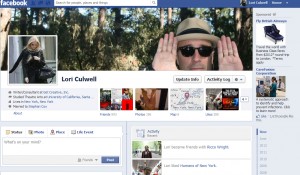
A Facebook Profile (and in fact, MY Facebook profile) looks like this:

This is where I go to interact with my friends and post pictures of weird food, and that picture at the top is of Stephan vogueing in a forest.   In fact, I do not want you to friend request me unless I know you in person (no offense!).  I am actively trying to pare down my Facebook friends list to return it to consisting of “people I actually know,” so I have been unfriending people like crazy this year, at the rate of one or two per day.   Mostly this consists of “people I only know inadvertently through other people” or “people who friended me for marketing purposes or to ask me about writing,” and again, I am sorry– I am trying to set a good example for those authors I lecture in my book on this subject, and have non-friend types just go over and follow my Facebook Fan Page.    Facebook gets a little too confusing for me when I read through my news feed, because my brain tries to actually contextualize each person and what they are saying as soon as I see their name, and I think this is draining my brain’s battery life.  In an effort to streamline, I am cutting down the list, and I would encourage you to do the same!

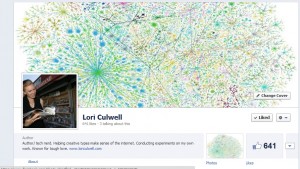
While we are on the subject of Facebook Fan Pages, I will tell you that a Facebook Fan Page looks like this:

This is where you should go to see me talking about internet and book stuff.   https://facebook.com/LoriCulwellAuthor

On a Facebook Fan Page, there is no limit (and never has been) to the number of fans you can have.   Some people (like Lady Gaga) have millions.   In a Facebook Fan Page, all a fan has to do is “Like” the page.

Frankly, I’m not sure why Facebook has chosen to lift the “5,000 friend” limit, and if I were a person with more than 5,000 friends, this would make me nervous.  Lifting the limit only encourages people who are blatantly disregarding Facebook’s Terms of Service, which state (I’m not a lawyer, so don’t quote me) that you can’t “friend” people you don’t know in order to sell them things, and why else would you friend people you didn’t know, especially in numbers that large?

I’m half-suspecting that this is a trap set by Facebook to catch blatant marketers, to see who will notice the limit lift and use it as an excuse to friend thousands of people, which Facebook can then use as grounds to ban them.  This would not surprise me, and in fact, I have gone back and forth on numerous occasions with Facebook on behalf of people who were, for instance, using a Facebook profile as a business, only to find one day that Facebook had taken away not only their profile, but all of their friends with it.  Don’t let this happen to you!

At any rate, just because you CAN have more Facebook friends doesn’t mean you should.  This might be a glitch, it might be a trap, or it might be a reminder that you need to either turn your overstuffed Facebook profile into a Fan Page, or that you have something you want to sell, so you should get around to starting up a Fan Page and ask your friends to “Like” it.

Whatever the reason, please do not take this as an excuse to friend a thousand people for marketing purposes, or to continue using a personal profile as a business.  Facebook doesn’t want to turn into MySpace, and eventually they are going to crack down on people who are doing this.  Remember, Facebook is a business, they want to make money, and part of their business model is to make it so that you have to pay for Facebook Ads to build up the audience to your Facebook Fan Page.   They’re not going to just suddenly let you have 10,000 friends with no consequences.  I think this is a trap Facebook is setting for “over-marketers,” meaning people with low/ no budget to run ads who traditionally would go into the system, friend thousands of people, and then spam them with links/ things they are trying to promote or sell. I predict that we will start to see people who do that get their accounts taken away.  Just my opinion.

Watch your step!

Advertising Your Book on Amazon KDP– a Step by Step Guide

If you’re looking to boost the visibility of your book and win new readers, Amazon’s advertising platform is a powerful place to do it. Yes to paid advertising all day long! Sponsored Product Ads, in particular, can help you stand out in a crowded market and reach potential buyers who are actively browsing or searching for books. Below is a straightforward, step-by-step guide to get you started.

However (and this is a big however!), I bet you’re not ready to run ads, and I would love to save you some money by making sure you (and your book) are totally ready before you spend one penny on ads.


Step 1: Prepare Your Author Platform

Before you invest in ads, make sure there’s a way for new readers to stay connected with you—beyond just a single purchase. That’s where your author platform comes into play.

  • Create or Update Your Website
    Even a simple site that showcases your books, your bio, and an email signup form helps establish credibility. Include links to your social media pages, plus an easy way for readers to contact you.
  • Offer a Reader Magnet
    Provide a free short story, a bonus chapter, or any other special content in exchange for readers’ email addresses. This way, when ads drive traffic to your Amazon book page, you can also direct people to your site to join your email list.
  • Stay Active on Key Social Channels
    It’s better to focus on one or two platforms (e.g., Facebook, Instagram) rather than trying to be everywhere. Regular updates and interactions show potential readers you’re an engaged, authentic author and will give them a chance to follow and engage with you that you don’t have to keep paying for (and also, hopefully, get them to sign up for your email list).

An established platform doesn’t just build trust with potential readers—it also means you won’t be depending on ads alone to maintain contact with your audience. Once someone discovers you through an ad, you have a place to invite them where they can become long-term fans.

I’m so serious right now– do NOT PROCEED TO THE NEXT STEP UNTIL THIS IS DONE. Do not spend one penny on advertising, marketing, or book promotion of any kind until you have these things set up. If you do, you are basically pumping money through your book, not building your career and your business as an actual author.If you don’t have a link inside your book to a reader magnet where people can sign up for your email list, you are not ready to run paid ads.  Stop right here and set all of that up!!


Step 2: Prepare Your Book Listing

A good ad can only do so much if your product page isn’t ready to convert visitors into buyers. Treat your listing like a mini sales page.

  • Book Cover
    Make sure it looks professional and matches the style typical of your genre. Think of your cover as a billboard that has just a few seconds to capture attention.
  • Competitive Analysis
    Look at other top-selling books in your genre. Pay special attention to their cover design, book descriptions, pricing, and keywords. Ask yourself what makes your book different or more appealing. Incorporate these insights into your own listing strategy.
  • Description
    Write a concise, compelling blurb that hooks readers right away. If it’s too long or unorganized, visitors may lose interest. Use Amazon-allowed HTML (bold, italics, bullet points) to make it more scannable.
  • Keywords & Categories
    Fill in relevant, accurate keywords so Amazon knows when and where to display your book. Double-check you’re in the best categories to reach your ideal readers.
  • Reviews
    While not strictly required to start advertising, having some positive reviews can dramatically increase your conversion rate once people click on your ad.

Step 3: Access Amazon Advertising

  1. Log in to KDP: Go to your KDP Bookshelf at kdp.amazon.com and sign in.
  2. Select a Book: Find the title you want to promote and click “Promote and Advertise.”
  3. Open Amazon Advertising: You’ll land in the Amazon Advertising dashboard, where you can create and manage campaigns. If it’s your first time, Amazon may provide a quick tutorial.

Step 4: Choose Your Campaign Type

Sponsored Products are the most common and beginner-friendly option for authors:

  • Reach Readers in Search: Your ad can appear in search results for relevant keywords.
  • Feature Your Book Cover: Readers see your cover, title, and a short text snippet, which is very direct and clickable.

Click “Create campaign” and select “Sponsored Products.”


Step 5: Decide on Targeting

Amazon offers two main targeting methods for Sponsored Products:

  • Automatic Targeting
    Amazon uses your book’s metadata—title, subtitle, categories, and keywords—to decide who sees your ad. This option is quick to set up and great for gathering data on which search terms convert.
  • Manual Targeting
    You choose specific keywords or ASINs (competing or complementary books). This approach provides more control but requires keyword research.

Many authors begin with an auto campaign to discover which keywords work best, then launch a manual campaign focusing on the strongest keywords or ASINs.


Step 6: Set Your Budget and Bids

  • Daily Budget
    Decide how much you’re willing to spend each day (e.g., $5 to $10 is typical for beginners). You can increase this later if you see good traction.
  • Default Bid
    This is the amount you’re willing to pay per click. Start modestly—maybe $0.30–$0.50—then adjust if you’re not getting enough impressions or if your costs are too high.
  • Bid Optimization
    For beginners, “Dynamic bids—down only” lets Amazon lower your bid in real-time if it thinks a click is less likely to convert. This helps keep you from overpaying.

Step 7: Create Your Ad Copy (Optional)

Sponsored Products ads typically display your book cover and metadata by default. However, you may have the option to add a short custom text blurb. Keep it brief, focusing on a key benefit or hook for your target readers. Avoid promotional language like “On sale now” or “#1 best seller,” as Amazon’s policies may disallow certain claims.


Step 8: Review and Launch

Double-check everything:

  • Campaign name (helps you stay organized if you run multiple campaigns)
  • Start/end dates (you can leave it open-ended and pause manually)
  • Budget and bids (are they realistic for your goals?)
  • Targeting type (auto or manual)
  • Ad creative (cover, short text)

When satisfied, click “Launch campaign.” It can take a few hours—sometimes up to 24—for Amazon to approve and start displaying your ads.


Step 9: Monitor and Optimize

Advertising on Amazon isn’t a “set it and forget it” process. Keep an eye on:

  • Impressions: If these are too low, consider raising your bid or increasing the daily budget.
  • Clicks/CTR: A low click-through rate might mean your cover or ad text isn’t resonating with your audience.
  • Sales/ACOS: Look at your Advertising Cost of Sales. Aim to keep it below your profit margin.
  • Search Term Report: Especially useful for auto campaigns. Identify which terms or ASINs lead to profitable sales, and which just eat up your budget.

Step 10: Expand with Manual Campaigns

After you’ve gleaned insights from your auto campaign, create Manual Sponsored Products campaigns:

  • Keywords: Add the high-performing terms from your auto campaign.
  • Negative Keywords: Exclude words that consistently lead to clicks but no sales.
  • ASIN Targeting: If a particular competing or complementary book converts well, target that ASIN specifically.

Adjust bids as needed. Raise bids on profitable keywords, lower or pause those that are underperforming.


Step 11: Rinse and Repeat

Amazon advertising is an iterative process:

  • Test New Keywords: Trends change, new reader preferences emerge, so keep refining your approach.
  • Experiment with Additional Campaign Types: Sponsored Brand ads (if you have multiple books) or Lockscreen ads (on Kindle devices) can also be worth exploring.
  • Stay Vigilant: Even small tweaks—like altering your bid by a few cents—can have a meaningful impact on your results.

Final Thoughts

Advertising on Amazon can be a fantastic way to reach new readers, but it works best when you’ve prepared a rock-solid foundation. By building a vibrant author platform, refining your book listing (with a solid cover, compelling description, and smart keyword choices), and understanding how to target your ads, you’ll give yourself the strongest chance for success. Then, once your campaigns are live, stay curious and keep optimizing—because the best results come from thoughtful experimentation and consistent follow-through.


All About BookFunnel: What is It? Why Do Authors Need It? Is it Worth it?

Because I am (apparently) never done bombarding you with new things you need and have to pay for, let’s talk about something I use that I think you should use if you have the budget:  BookFunnel.

What is BookFunnel?

Long story short, BookFunnel is a website that helps authors deliver their books to readers seamlessly. It offers a range of tools for distributing eBooks, managing giveaways, conducting pre-orders, and building an engaged reader base. By providing a one-stop shop for all of this stuff, BookFunnel simplifies the (often overly complicated) processes of book distribution and reader engagement.

Why Would You Need It?

One of the primary reasons authors use BookFunnel is its ability to facilitate seamless book distribution. That means you can deliver their books directly to readers in multiple formats, including ePub, PDF, and MOBI, ensuring compatibility across various devices and eReaders. This flexibility enhances the reader’s experience by reducing technical barriers to accessing your work. It makes your life easier because you don’t have to manage multiple emails of people having technical problems trying to open your pdf on whatever e-reader they are using at the moment (which you know all too well if you’ve ever tried to manage a free giveaway like bonus material or ARC distribution in eBook form). What you don’t want is to be trying to trouble-shoot every single person’s tech problems while you’re in the middle of your launch, and BookFunnel solves that problem for you. To me, that alone makes it worth the money.

Building and managing email lists is another advantage BookFunnel offers. As I’ve said approximately one million times, an engaged email list is one of the most valuable assets for an author, and BookFunnel integrates seamlessly with popular email marketing services like Mailerlite and Email Octopus. These integration enable authors to grow their subscriber base by offering free books or exclusive content as incentives for sign-ups, fostering a direct line of communication with their readers.

ARC distributions and bonus materials are the reason I personally use them. I used to distribute all of that kind of stuff via PDF, but then I heard a crazy nightmare story about a fellow author sending out ARCs via PDF (using one of the services, not their own list, just to be clear), and later having one of the ARC readers upload that PDF into Amazon and publish it as their own work.  Because the PDF didn’t have any kind of tracking or watermarking, the author could not prove ownership to Amazon and ended up having to get a lawyer involved to get their work back.

After that I stopped distributing any of my work via PDF.  Now I only use ePubs distributed through BookFunnel, with watermarking and tracking turned on. BookFunnel employs secure delivery methods to prevent unauthorized sharing and piracy. Features like DRM-free downloads and personalized download links ensure that authors’ work is protected while still being easily accessible to legitimate readers.

And look, I get that if you’re a first-time author, alot of that probably seemed like gibberish to you and something that you don’t even want to think about yet, and I get that. The problem is, that kind of thing is something that can happen to you at any time in your career (and in fact, the scary example above was for that author’s debut novel), so it actually benefits you to put some advanced security measures in place, even if it costs extra.  I do feel like the money you will spend on BookFunnel is money that you would probably have spent on an ARC service if you didn’t know what you were doing, if that’s any reassurance. This is another example of “build it the first time properly and you won’t have to spend money to revise it,” I suppose.

BookFunnel Pricing

BookFunnel offers several pricing tiers to cater to authors at different stages of their careers and with varying needs. The Basic Plan starts around $15 per month and includes a limited number of downloads, basic email integrations, and standard support. This plan is ideal for authors who are just starting out and have modest distribution needs, and you can pay for a year in advance to get a discount.

The Pro Plan is approximately $29 per month and offers increased download limits, advanced email integrations, priority support, and additional customization options for delivery pages. This plan suits growing authors who need more robust features to manage their expanding reader base and promotional activities.

For established authors with larger audiences, the Premium Plan costs roughly $99 per month. It includes unlimited downloads, full access to all integrations and customization options, dedicated support, and enhanced analytics and reporting. This comprehensive plan is perfect for authors who require extensive distribution capabilities and detailed insights into their promotional efforts.

It’s important to note that pricing may vary, and BookFunnel occasionally offers discounts or custom plans for high-volume authors and publishers, making it adaptable to different budgetary requirements.

Setting Up BookFunnel

Getting started with BookFunnel is a straightforward process that begins with choosing a pricing plan on their website. Many authors start with a free trial to explore the features before committing to a paid plan. Once you’ve selected a plan, the next step is to integrate BookFunnel with your preferred email marketing service. This integration streamlines list-building by automatically adding new subscribers to your email list when they download your book through BookFunnel.

After setting up the integration, upload your properly formatted eBook files (ePub, PDF, or MOBI) to your BookFunnel account. Ensuring your book is free of errors will provide readers with the best possible experience. With your files in place, create a download page and personalize it with your branding elements—like your author photo, book cover, and a compelling call-to-action. BookFunnel’s templates make this easy, even if you have limited design skills.

Once your download page is ready, it’s time to set up your first campaign. Whether you’re planning a giveaway, a pre-order, or a promotional offer, be sure to define clear parameters for participation—such as asking readers to join your email list or share your campaign on social media. After you’ve finalized these details, distribute the download link through your website, social media channels, email newsletters, and other marketing platforms. BookFunnel’s real-time tracking tools help you monitor performance and make adjustments on the fly.

Finally, once your campaign concludes, review the analytics to see what worked and what could be improved. Use these insights to refine your future campaigns, optimizing your strategies for better results and stronger reader engagement.

Conclusion

In the competitive world of publishing, standing out requires more than just writing a great book—it involves effectively promoting and distributing it. BookFunnel offers authors a powerful set of tools to streamline these processes, from managing giveaways and pre-orders to building a loyal email list and engaging with readers. Its user-friendly interface, comprehensive features, and robust integrations make it an indispensable asset for authors aiming to maximize their reach and impact.

By investing in BookFunnel, authors can save time, protect their work, and create meaningful connections with their audience, ultimately driving greater success in their writing careers. Whether you’re launching your first novel or looking to enhance your existing promotional strategies, BookFunnel provides the support and functionality needed to thrive in today’s digital landscape.


For more information, visit BookFunnel’s website to explore how it can help you reach more readers and streamline your book promotion efforts.

Steps to Building Your Author Email List from Scratch

Are you starting from zero with your email list? Don’t worry – you’re in the right place! Building an author email list might sound intimidating, but it’s one of the best ways to connect with readers, promote your books, and grow a loyal community.

In this guide, we’ll show you how to build your author email list step by step – from your first subscriber to a ravenous group of superfans that can’t wait for your next release. This is an even more broken down version of this post, where I basically talk about how you must have a link to your reader magnet/ email signup inside your book before you can do anything else, period, end of story.


1. Decide on an Email Marketing/ Autoresponder Service

Good news – plenty of fantastic email tools make it easy to grow and manage your list. These services help you create beautiful emails, forms, pop-ups, and automations to attract and retain subscribers. This list (and even more providers) can be found on this page as well.

In case you’re about to say “I have no idea what an autoresponder service is,” that’s fine. Now is your time to learn.

An email autoresponder service is a tool that automatically sends pre-scheduled emails to subscribers after they join your mailing list. These services are part of email marketing platforms that help you manage your email list, create campaigns, and build relationships with readers by automating communication.

For example, when someone signs up for your mailing list, an autoresponder can instantly send a welcome email. From there, you can schedule a series of emails, such as updates about your books, exclusive content, or promotions.

Got it?  Got it!  Here are the ones I use:

  • Mailerlite – Known for its user-friendly interface, Mailerlite offers powerful tools like landing pages, pop-ups, and automation workflows.
  • EmailOctopus – A cost-effective option, EmailOctopus integrates seamlessly with Amazon SES and helps you send beautiful, customized campaigns on a budget.
  • Aweber – Aweber provides drag-and-drop email design, list management, and automation features. It’s ideal for beginners who need reliable tools and robust customer support.
  • Kit – Kit combines email marketing and ecommerce tools, making it easy to promote books, share freebies, and analyze subscriber behavior.
  • GetResponse – A versatile platform offering advanced automation, landing pages, and even webinars to engage your audience and expand your reach.

Each of these tools offers free trials or affordable starter plans, so pick one that best suits your goals and budget.

Oh, and if you’re wondering why I didn’t mention MailChimp, please see my rant about them over here.  I’m SO DONE WITH THEM, and I’m trying to figure out the best way to get one of old email lists back from them before they start charging me a zillion dollars.

Here’s a video about email marketing services if you are more of a visual learner.


2. Create an Irresistible Reader Magnet

The fastest way to attract subscribers is by offering a compelling freebie in exchange for their email. Your freebie should be valuable, relevant to your audience, and hard to resist.  Oh, and I’m sure this goes without saying, but the reader magnet goes inside your book!

Here are some ideas for author freebies:

  • Exclusive short stories or deleted scenes.
  • First chapter preview of your book.
  • Printable resources: character worksheets, writing prompts, or book trivia challenges.
  • Sneak peeks of upcoming releases.
  • If you write non-fiction, consider a companion workbook or step-by-step guide.

If this is something you want to know alot more about, can I recommend Tammi Labreque’s excellent books?  Tammi is the absolute best.

Here’s a video about reader magnets!


3. Build a Dedicated Landing Page for Your Freebie

A landing page is a single, focused page where visitors can learn about your freebie and sign up for it. Its job is simple: convince readers to share their email address.

Here’s what your landing page needs:

  • A bold headline: Highlight the freebie (e.g., “Get Your Free Short Story – Step into [Book Title]!”).
  • A subheadline: Add intrigue (e.g., “Exclusive content you won’t find anywhere else!”).
  • Visuals: Show your freebie with an eye-catching graphic.
  • Bullet points: Briefly list the benefits of signing up.
  • A clear call-to-action (CTA): Use inviting text like “Download Now!”.
  • Simple form: Only ask for the name and email.

Remove distractions like navigation menus or extra links to keep the focus on signing up.   I use BookFunnel for these types of pages.  Here’s one of mine (in case you’re curious):  https://dl.bookfunnel.com/dr3z3jhlr4 


4. Set Up an Automated Welcome Email

When a reader subscribes, greet them with a warm welcome email. Email automation tools like Mailerlite, Aweber, or GetResponse make this easy to set up. MailChimp doesn’t allow free account holders to use this feature anymore, which is why I quit them.

A single welcome email works, but a welcome sequence builds a stronger connection:

  • Email 1: Thank readers for subscribing and deliver the freebie (attach it or share a download link).
  • Email 2: Introduce yourself and your writing journey. Share what readers can expect from your emails.
  • Email 3: Offer something extra – a discount, sneak peek, or exclusive content to make subscribers feel special.

This sequence helps new readers feel welcome, builds trust, and sets the stage for future updates.

Here’s a video about the welcome email series.


5. Get the Word Out About Your Freebie

Once your freebie is ready, it’s time to spread the word and attract subscribers.

  • Social Media: Create graphics showcasing your freebie with tools like Canva. Write engaging captions like, “Want to know what happens before [Character’s Name]’s adventure? Get my free prequel story!” Pin your posts to the top of your profile.
  • Your Website/Blog: Use pop-ups, banners, or dedicated blog posts to promote your freebie. Highlight its value and include a clear CTA.
  • Substack: If you don’t have a website, Substack combines blogging and newsletters into one platform, helping authors attract readers with ease.

6. Network with Fellow Writers

Collaborating with other authors is a fantastic way to grow your audience. Networking allows you to share your work while reaching new readers.

  • Join Writing Communities: Engage in groups on Facebook, Reddit, or Discord. Share advice, collaborate on promotions, and support other writers.
  • Write Guest Posts: Contribute articles to author blogs or newsletters. Include a link to your freebie in exchange for your insights.
  • Host Joint Events: Collaborate on webinars, workshops, or virtual discussions to expand your reach and promote your email list.

7. Swap Newsletters with Other Authors

Newsletter swaps are a win-win strategy for indie authors. Promote another author’s freebie or book in your newsletter, and they’ll share yours with their audience.

Platforms like StoryOrigin and BookFunnel simplify the process by connecting authors with similar audiences:

  • StoryOrigin: Browse a database of authors, track results, and swap freebies effortlessly.
  • BookFunnel: Use group promos to reach thousands of readers through collaborative book promotions.

For the best results, partner with authors in your genre who have a similar audience size and readership.


8. Start Paid Advertising

Once you have absolutely all of these things in place, feel free to run paid advertising on your book (if for nothing else, just to grow your email list!).  Building an author email list is one of the most effective tools for connecting with readers, promoting your books, and growing a loyal fanbase. By offering irresistible freebies, using the right tools like Mailerlite, EmailOctopus, or Aweber, and networking with other authors, you’ll create a community that loves your work and eagerly supports your journey.

Seriously though, watch this video before you start paid advertising.  Don’t take any of Amazon’s suggested defaults or you will lose money!

Why I Quit MailChimp (for Author Email Marketing) and Why You Should Too

I was a MailChimp die-hard for a long time (like, at least 15 years), and I’m sad to say I am just about to move my last list and close my last account.  I finally hit my breaking point. MailChimp was once the go-to platform for email marketing. It’s user-friendly, has fun branding, and gets recommended everywhere. But over time, I discovered some serious downsides that made me rethink my loyalty to the service.

Here’s why I quit MailChimp, and why you might want to consider alternatives too.

The Allure and Hidden Costs of MailChimp

MailChimp has long been a popular choice for email marketers, especially those starting out. Its free plan, which offers up to 2,000 subscribers and 10,000 emails per month, seemed perfect for budding authors looking to build their mailing list without breaking the bank. However, the reality of scaling up revealed a different story.

1. Escalating Costs After the Free Plan

While MailChimp’s free plan is generous, transitioning to a paid plan quickly becomes expensive. Let’s break down the pricing for a more substantial subscriber base to highlight the disparity:

  • MailChimp:
    • Free Plan: Up to 2,000 subscribers and 10,000 emails/month.
    • Essentials Plan: Starts at $13 per month for up to 500 subscribers, escalating to $299 for 50,000 subscribers.
    • Standard Plan: Begins at $20 per month for 500 subscribers, reaching $499 for 50,000 subscribers.
    • Premium Plan: Starts at $350 per month for 10,000 subscribers, scaling up significantly from there.

In contrast, when you outgrow the free tier, MailChimp’s pricing can quickly become prohibitive, especially for authors who are just starting to monetize their readership.

MailerLite vs. MailChimp: A Cost Comparison

MailerLite offers a more affordable and straightforward pricing structure:

  • Free Plan: Up to 1,000 subscribers and 12,000 emails/month.
  • Paid Plans:
    • Paid Lite: Starts at $10 per month for up to 1,000 subscribers, scaling up to $50 for 5,000 subscribers.
    • Premium Plan: Offers advanced features starting at $21 per month for 1,000 subscribers.

When comparing for a subscriber base of 5,000:

  • MailChimp Essentials: Approximately $48/month.
  • MailerLite Paid Lite: $10/month.

MailerLite provides comparable, if not better, features at a fraction of MailChimp’s cost.

Email Octopus: Another Affordable Alternative

Email Octopus presents another budget-friendly alternative:

  • Free Plan: Up to 2,500 subscribers and 10,000 emails/month.
  • Paid Plans:
    • Paid: Starts at $10 per month for up to 5,000 subscribers.
    • Growth Plan: $25 per month for up to 15,000 subscribers.

For 5,000 subscribers:

  • MailChimp Essentials: Approximately $48/month.
  • Email Octopus Paid: $10/month.

Email Octopus not only matches MailChimp in terms of subscriber capacity but does so at a significantly lower price point.

2. The Missing Autoresponder Feature

One of the most critical features for authors is the autoresponder—automated email sequences that nurture relationships with readers, welcome new subscribers, and promote new releases. Unfortunately, MailChimp has removed access to its autoresponder feature from the free plan, forcing users to upgrade to paid tiers to retain this essential functionality.

Why Autoresponders Are Vital for Authors

Autoresponders enable authors to:

  • Welcome New Subscribers: Automatically send a welcome email when someone joins your mailing list.
  • Nurture Relationships: Engage with readers through regular updates, behind-the-scenes content, and exclusive offers without manual intervention.
  • Promote Releases: Schedule automated campaigns to announce new book launches, pre-orders, and special promotions.

Without access to autoresponders on the free plan, authors are left to manually manage these crucial communications or face the steep costs of upgrading to maintain automation.


3. They Raise Prices Without Adding Value

MailChimp has a habit of raising their prices without offering additional features or improving the user experience. While many services evolve and offer more value with price changes, MailChimp just… charges more.

To make matters worse, canceling your account isn’t as easy as it should be. It feels like they put up unnecessary roadblocks, as if hoping you’ll give up halfway through and stay. No one likes feeling trapped, especially when there are more affordable options out there.


4. You Pay for Unsubscribed Users Unless You Archive Them

This one was the final straw for me. Recently, MailChimp was called out for continuing to charge users for unsubscribed contacts unless they’re manually archived.

Think about that for a second:

  • Someone unsubscribes from your emails, and you assume they’re off your list.
  • MailChimp, however, still counts those people toward your subscriber total, which means you’re being charged for people who don’t even want to hear from you.
  • The only way to stop this? You have to manually archive those contacts – something MailChimp doesn’t openly tell you.

How are you supposed to know this? Unless you dig into the fine print or happen to stumble upon the issue, you’ll keep paying more for nothing. It’s shady and unfair, and it left a bad taste in my mouth.


Why Switching Makes Sense

Given the high costs and the removal of essential features like autoresponders from MailChimp’s free plan, switching to a more affordable and feature-rich provider like MailerLite or Email Octopus makes strategic sense. Here’s why:

Cost-Effectiveness

  • Significant Savings: Both MailerLite and Email Octopus offer comparable or superior features at a fraction of MailChimp’s cost.
  • Scalable Pricing: These alternatives provide scalable pricing models that grow with your subscriber base without exorbitant fees.

Comprehensive Features

  • Autoresponders Included: Unlike MailChimp, MailerLite and Email Octopus include autoresponder functionality in their free or low-cost plans, ensuring you can automate vital communications without additional expenses.
  • User-Friendly Interfaces: Both platforms are known for their intuitive interfaces, making it easier for authors to create and manage campaigns without a steep learning curve.

Superior Support and Flexibility

  • Dedicated Support: MailerLite and Email Octopus often provide more personalized customer support, catering specifically to the needs of small businesses and independent authors.
  • Flexible Integrations: These platforms integrate seamlessly with various author tools and websites, enhancing your overall marketing strategy.

Conclusion: Making the Smart Move for Your Author Brand

As an author, your primary focus should be on writing and engaging with your readers, not wrestling with expensive and limiting email marketing platforms. MailChimp’s escalating costs and the removal of key features like autoresponders from their free plan make it a less attractive option, especially when more affordable and equally capable alternatives like MailerLite and Email Octopus are available.

By switching to a platform that offers essential features at a sustainable price, you can invest more in your writing and marketing efforts, ultimately fostering stronger relationships with your readers and driving your author brand forward.

Don’t let high costs and missing features hold back your email marketing potential. Explore MailerLite and Email Octopus today and take control of your author communication strategy without breaking the bank.

The Bottom Line

MailChimp might look great on the surface, but their pricing model, lack of transparency, and frustrating user experience make it hard to justify sticking around. When there are services like MailerLite, EmailOctopus, AWeber, Kit, and GetResponse offering better features for a fraction of the cost, the choice becomes pretty clear. I actually have a breakdown of all the email services I recommend right here.

If you’re looking for:

  • Affordable pricing as your list grows,
  • Full access to essential features (like automation),
  • And a transparent, user-friendly experience

…then it’s time to consider leaving MailChimp behind.

Switching email platforms might seem daunting, but it’s worth it to save money, regain control of your list, and work with a service that values its users.

Your subscribers deserve the best. You do too.

Have you experienced frustrations with MailChimp? Let me know in the comments – I’d love to hear your story!